


For decades, network managers and engineers have turned to the command-line interface (CLI) more frequently. The CLI has given unrivaled control and accuracy whether setting devices, fixing problems, or automating chores. But the emergence of graphical user interfaces (GUIs) has begged a significant issue as the networking landscape changes: is the CLI doomed, or is it merely changing along with new technologies?
We will discuss in this post the reasons GUIs could reflect the future of networking, how they either complement or even replace conventional CLIs, and the changing scene of network management.
CLI: The Old Guard of Networking
CLI has been at the heart of network management for as long as many can remember. From setting switches and routers to controlling firewalls, the CLI provides difficult to match fine control. For network engineers, type in a command, run it, and get immediate feedback second nature. For in-depth configuration and troubleshooting, CLI has always been the recommended approach regardless of Cisco, Juniper, Dell, or another vendor.
Two main benefits of CLI are its scriptability and precision. Through a GUI, network engineers may automate tedious chores, set up massive networks with little effort, and run complicated commands that might be challenging or perhaps impossible. For individuals who have developed their abilities, the CLI also offers a strong feeling of power and control.
But the restrictions of CLI are becoming increasingly clear as networks get more complicated and IT environments get more dynamic.
Why GUIs Are Gaining Ground in Networking
Now enter the graphical user interface (GUI), a more aesthetically pleasing and logical method of network control. Networking solutions are including GUIs more and more to streamline management, monitoring, and setup chores.
CLI gives accuracy; GUIs give user-friendliness and visual clarity. GUIs let network managers instantly view traffic flow, alert status, and network device condition. Just point, click, and configure; there is no remembering of commands. GUIs provide an easily available way for teams lacking networking knowledge to manage challenging systems.
The growing popularity of GUIs is mostly due to the following:
- Ease of use: GUIs are meant to be intuitive—even for non-experts.
- For SD-WAN systems, cloud-based networks, and multi-vendor setups.
- Graphical depictions of network health, device statuses, and traffic patterns enable managers to make quick, educated decisions.
Leading networking companies such as Cisco and Juniper have embraced GUIs to go along with their conventional CLI-based setups. For network management, for instance, Cisco’s DNA Center offers a graphic interface; Juniper’s Contrail lets centralized administration via a user-friendly dashboard.
CLI vs GUI – Flexibility vs Simplicity
So, which is better? It depends on the task at hand.
CLI Strengths:
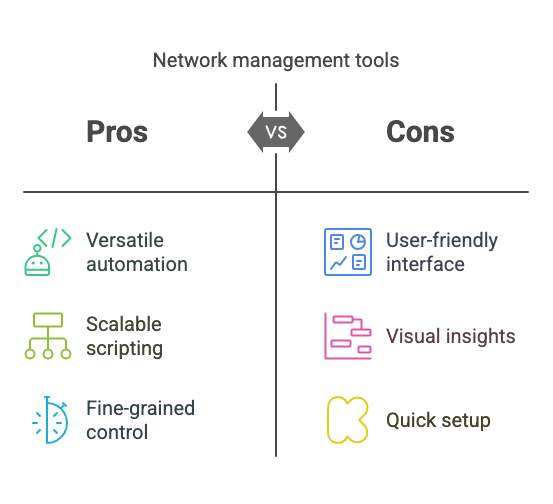
- For complex setups, troubleshooting, or automation, CLI provides unparalleled versatility. CLI usually stays the finest tool if you are a network engineer managing complicated routing protocols or multicast configurations.
- Scaling up network administration depends on the capacity to automate chores using scripting languages like Python, which the CLI enables.
GUI Strengths:
- Visualizing network health, understanding traffic patterns, and rapidly setting devices all benefit from simplicity in GUIs. GUIs simplify network management for chores not requiring fine-grained control.
- Graphical dashboards let managers quickly assess network performance, seeing possible problems before they become significant.
For instance, the GUI might be excellent for rapidly configuring fundamental settings across hundreds of access points if you run a sizable campus network. However, the CLI can be the more useful instrument for debugging network performance problems.
 The Hybrid Approach – A Balance Between the Two
Many companies are using a hybrid strategy instead of deciding whether between CLI or GUI is best. Contemporary network management systems let managers use both. For daily monitoring and configuration, for example, you might utilize a GUI; but, for troubleshooting or for jobs requiring more sophisticated settings, you depend on the CLI.
This mix keeps accessibility while allowing versatility. It also allows network automation, whereby network engineers see and monitor network performance using a GUI while scripting configurations using the CLI.
The ideal of both worlds is probably where networking is headed: strong, user-friendly tools for both seasoned professionals and fresh graduates.
 Is the CLI Doomed? A Look into the Future of Networking
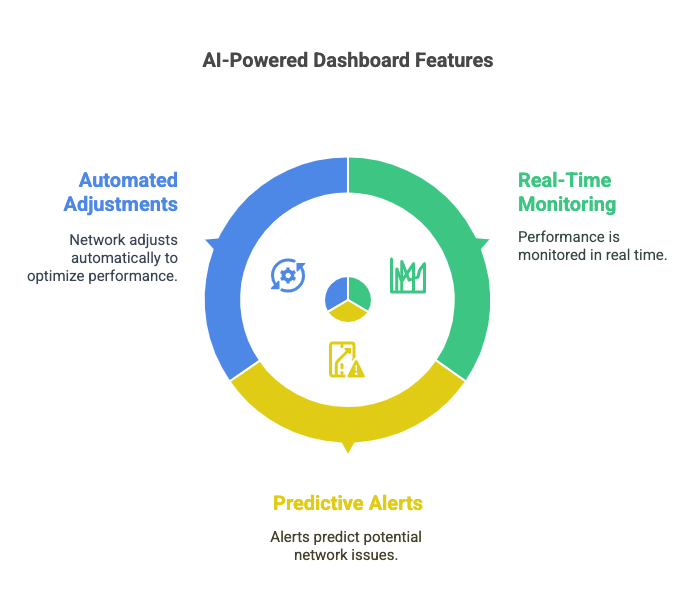
Solutions that are both clever and user-friendly are increasingly sought for as networking changes. Long term, automation, machine learning, and artificial intelligence are all forces that might help to lessen reliance on CLI. AI-based network management systems have the ability to independently find and fix problems, hence perhaps reducing the need for human intervention.

That does not mean, though, that the CLI is disappearing soon. It still offers some degree of control and accuracy that GUIs cannot equal. Furthermore, the CLI will always be an essential tool in highly complicated settings or for deep technical troubleshooting.
Future GUIs driven by artificial intelligence may show more ease of use of a graphical interface while automating many of the chores usually reserved for the CLI. While for now both tools will probably coexist, this will speed up and simplify network management.
Conclusion
Although GUIs are clearly taking front stage in network management, the CLI is not going anywhere. Both have their role; it is not about one substituting the other. Rather, the future of networking is in a hybrid model whereby the benefits of both CLI and GUI can be used to control ever more complicated IT infrastructures.
Ultimately, the work is more important than the instrument—not about either one thing. Whether you go with CLI or GUI, it’s about discovering the correct method for the current work.
